Difference between revisions of "Install & Connect"
Jump to navigation
Jump to search
EvilManfred (talk | contribs) |
(Replace page with clean, standard MediaWiki landing page; remove custom layout and inline CSS) |
||
| Line 1: | Line 1: | ||
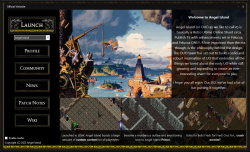
[[File:launcherss.png|thumb|right|250px|link=https://drive.google.com/file/d/1Rsur1WoEhkvmTMB3b6iFpHn_4Ar97WGQ/view?usp=sharing|The launcher's current interface.]] | [[File:launcherss.png|thumb|right|250px|link=https://drive.google.com/file/d/1Rsur1WoEhkvmTMB3b6iFpHn_4Ar97WGQ/view?usp=sharing|The launcher's current interface.]] | ||
= Install & Connect = | |||
=Install & Connect= | |||
The launcher will install both Angel Island and Siege Perilous all at once. Both shards are available through the server listing once logged in to the game. | The launcher will install both Angel Island and Siege Perilous all at once. Both shards are available through the server listing once logged in to the game. | ||
==Using the launcher== | == Using the launcher == | ||
1 | 1. Download the launcher [https://drive.google.com/file/d/1Rsur1WoEhkvmTMB3b6iFpHn_4Ar97WGQ/view?usp=sharing here]. | ||
2 | 2. Double-click setup to install the launcher. | ||
3 | 3. Run the launcher. | ||
4 | 4. Create a Profile and Install the game to your desired location. | ||
5 | 5. Select Launch in the top right corner. | ||
Enjoy the game and please check [[Getting Started]] for help with gameplay. You can also [[Ask a Guard]] for help or even another player in the [https://discord.gg/eRq4U2Gk9z Angel Island Discord. | Enjoy the game and please check [[Getting Started]] for help with gameplay. You can also [[Ask a Guard]] for help or even another player in the [https://discord.gg/eRq4U2Gk9z Angel Island Discord]. | ||
==Downloads== | == Downloads == | ||
'''[https://drive.google.com/file/d/1Rsur1WoEhkvmTMB3b6iFpHn_4Ar97WGQ/view?usp=sharing UO:Angel Island Launcher]''' | * '''[https://drive.google.com/file/d/1Rsur1WoEhkvmTMB3b6iFpHn_4Ar97WGQ/view?usp=sharing UO: Angel Island Launcher]''' | ||
* [https://www.uocartographer.com/Beta/UOCSetup.exe UO Cartographer – Map Assistant] | |||
== Connect == | |||
Server IP/Name – uoangelisland.com | |||
Server IP/Name – uoangelisland.com | Port – 2593 | ||
=== Shard Accessibility === | |||
Currently Angel Island has 3 shards available to connect to. | Currently Angel Island has 3 shards available to connect to. | ||
Angel Island – This is the live production server. Create your character and get immersed in the best MMO ever made! | * '''Angel Island''' – This is the live production server. Create your character and get immersed in the best MMO ever made! | ||
* '''Siege Perilous TC''' – This is our test center. It gives players the ability to test different skills and functionalities of the shard without having to worry about resources or time. | |||
Siege Perilous TC – This is our test center. It gives players the ability to test different skills and functionalities of the shard without having to worry about resources or time | * '''Siege Perilous''' – A classic Siege Perilous shard, currently open to the public for a live beta test. | ||
Siege Perilous | |||
Latest revision as of 19:45, 2 January 2026

Install & Connect
The launcher will install both Angel Island and Siege Perilous all at once. Both shards are available through the server listing once logged in to the game.
Using the launcher
1. Download the launcher here. 2. Double-click setup to install the launcher. 3. Run the launcher. 4. Create a Profile and Install the game to your desired location. 5. Select Launch in the top right corner.
Enjoy the game and please check Getting Started for help with gameplay. You can also Ask a Guard for help or even another player in the Angel Island Discord.
Downloads
Connect
Server IP/Name – uoangelisland.com Port – 2593
Shard Accessibility
Currently Angel Island has 3 shards available to connect to.
- Angel Island – This is the live production server. Create your character and get immersed in the best MMO ever made!
- Siege Perilous TC – This is our test center. It gives players the ability to test different skills and functionalities of the shard without having to worry about resources or time.
- Siege Perilous – A classic Siege Perilous shard, currently open to the public for a live beta test.