Difference between revisions of "Known Issues"

From GMN Wiki
Jump to navigation Jump to search
(Replace page with clean, standard MediaWiki landing page; remove custom layout and inline CSS)
 
Line 1: Line 1:
<div id=swordborder style="
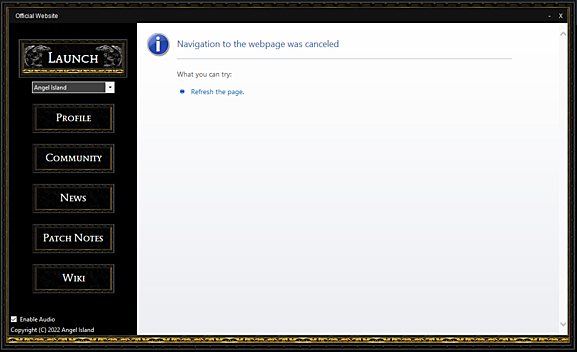
The image below shows what the Angel Island Launcher looks like when you are not connected to the internet. Once connected, click Refresh to continue.
left:-243px;
top:10px;">
[[File:wikisidebarart.png|link=]]
</div>
 
<div id=swordborder style="
left:-178px;
top: -172px;">
[[File:wikitop4.png|link=]]
</div>
 
<div id=cf style="
left:-192px;
top: -122px;">
[[File:tchestbase2.gif|class=bottom|link=Main_Page]]
</div>
 
<div id=cf style="
left:-58px;
top: -109px;">
[[File:lit01.gif|class=bottom|link=Main_Page]]
</div>
 
<div id=cf style="
left:-145px;
top: -98px;">
[[File:lit02.gif|class=bottom|link=Main_Page]]
</div>
 
<div id=cf style="
left:-70px;
top: -123px;">
[[File:lit04.gif|class=bottom|link=Main_Page]]
</div>
 
<div id=cf style="
left:-161px;
top: -109px;">
[[File:lit06.gif|class=bottom|link=Main_Page]]
</div>
 
<div id=cf style="
left:-127px;
top: -83px;">
[[File:64.png|class=bottom|link=Main_Page]]
</div>
 
<div id=cf style="
left:-192px;
top: -121px;">
[[File:tchestlid2.gif|class=top|link=Main_Page]]
</div>
 
<div id=cf style="
left:-114px;
top: -135px;">
[[File:wikilogo5.png|class=bottom|link=Main_Page]]
</div>
 
<div id=cf style="
left:-182px;
top: -165px;">
[[File:aispwiki.png|class=bottom|link=Main_Page]]
</div>
 
<div id=menubutton style="
left:-110px;
top: 383px;">
[[File:totoparrow2f.png|class=bottom|link=#top|Back to Top]]
[[File:totoparrow1f.png|class=top|link=#top|Back to Top]]
</div>
 
<div id=menubutton style="
left:-140px;
top: 400px;">
[[File:mainmenu02f.png|class=bottom|link=Main_Page]]
[[File:mainmenu01f.png|class=top|link=Main_Page]]
</div>
 
<div id=menubutton style="
left:-110px;
top: 450px;">
[[File:tobotarrow2.png|class=bottom|link=#footer|Bottom of Page]]
[[File:tobotarrow1.png|class=top|link=#footer|Bottom of Page]]
</div>
 
<div id=menubutton style="
left:-140px;
top: 450px;">
[[File:sbit.png|link=]]
</div>
 
<div id=menubutton style="
left:-90px;
top: 450px;">
[[File:sbit2.png|link=]]
</div>
 
{{#css:
 
#p-logo { display:none; }
 
#p-Quick_Navigation-label {
    color:orange;
    font-size:62%;
    text-shadow:0px 0px 4px black, 0px 0px 6px white
}
 
#p-tb-label {
    color:orange;
    font-size:62%;
    text-shadow:0px 0px 4px black, 0px 0px 6px white
}
 
#n-Download-the-Game a {
    color:#FAF9F6;
    font-size:94%;
    text-shadow:0px 0px 4px #0000FF, 2px 2px 8px black
}
 
#n-Join-the-Discord a {
    color:#FAF9F6;
    font-size:94%;
    text-shadow:0px 0px 4px #0000FF, 2px 2px 8px black
}
 
#n-Visit-the-Website a {
    color:#FAF9F6;
    font-size:94%;
    text-shadow:0px 0px 4px #0000FF, 2px 2px 8px black
}
 
#n-Install-Guide a {
    color:white;
    font-size:86%;
    text-shadow:0px 0px 4px #0000FF, 2px 2px 8px black
}
 
#n-Skills-Overview a {
    color:white;
    font-size:86%;
    text-shadow:0px 0px 4px #0000FF, 2px 2px 8px black
}
 
#n-Custom-Content a {
    color:white;
    font-size:86%;
    text-shadow:0px 0px 4px #0000FF, 2px 2px 8px black
}
 
#n-Wiki-Credits a {
    color:white;
    font-size:86%;
    text-shadow:0px 0px 4px #0000FF, 2px 2px 8px black
}
 
#t-whatlinkshere { display:none }
#t-recentchangeslinked { display:none }
#t-info { display:none }
#t-relatedchanges { display:none }
 
#t-permalink a {
    color:white;
    font-size:82%;
    text-shadow:0px 0px 4px #0000FF, 2px 2px 8px black
}
 
#t-print a {
    color:white;
    font-size:82%;
    text-shadow:0px 0px 4px #0000FF, 2px 2px 8px black
}
 
#t-specialpages a {
    color:white;
    font-size:82%;
    text-shadow:0px 0px 4px #0000FF, 2px 2px 8px black
}
 
#cf {
  position:absolute;
  margin:0 auto;
  width:238px;
}
 
#swordborder {
  position:absolute;
  margin:0 auto;
  width:1350px;
}
 
#menubutton {
  position:absolute;
  margin:0 auto;
  width:200px;
}
 
#cf img {
  position:absolute;
  left:0;
  -webkit-transition: opacity 0.2s ease-in-out;
  -moz-transition: opacity 0.2s ease-in-out;
  -o-transition: opacity 0.2s ease-in-out;
  transition: opacity 0.2s ease-in-out;
}
 
#swordborder img {
  position:absolute;
  left:0;
}
 
#menubutton img {
  position:fixed;
  left:1;
  bottom:0;
  -webkit-transition: opacity 0.2s ease-in-out;
  -moz-transition: opacity 0.2s ease-in-out;
  -o-transition: opacity 0.2s ease-in-out;
  transition: opacity 0.2s ease-in-out;
}
 
 
#cf img.top:hover {
  opacity:0;
}
 
#menubutton img.top:hover {
  opacity:0;
}
 
 
}
 
}}
 
</div>


https://game-master.net/images/wiki/knownissues/launchererror.png


The above image shows what the Angel Island Launcher looks like when you aren't connected to the internet. Once connected, click refresh to continue.


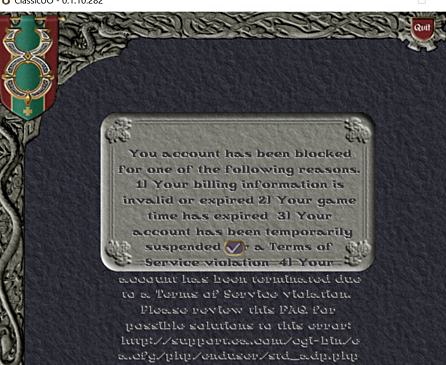
The image below shows what the client will look like when you are trying to log in to an account but have already reached the maximum accounts-per-IP limit.

https://game-master.net/images/wiki/knownissues/acctlimit.png


The above image shows what the client will look like when you are trying to log in to an account but you have already reached the maximum accounts per IP limit restriction.


It could also look like this:


https://game-master.net/images/wiki/knownissues/loginhang.png

Latest revision as of 04:58, 4 January 2026

The image below shows what the Angel Island Launcher looks like when you are not connected to the internet. Once connected, click Refresh to continue.

launchererror.png


The image below shows what the client will look like when you are trying to log in to an account but have already reached the maximum accounts-per-IP limit.

acctlimit.png


It could also look like this:

loginhang.png