Difference between revisions of "Downloads"

From GMN Wiki
Jump to navigation Jump to search
(Replace page with clean, standard MediaWiki landing page; remove custom layout and inline CSS)
 
Line 1: Line 1:
<div id=swordborder style="
[[File:launcherss.png|thumb|right|250px|link=https://drive.google.com/file/d/1Rsur1WoEhkvmTMB3b6iFpHn_4Ar97WGQ/view?usp=sharing|The launcher's current interface.]]
left:-243px;
top:10px;">
[[File:wikisidebarart.png|link=]]
</div>
 
<div id=swordborder style="
left:-178px;
top: -172px;">
[[File:wikitop4.png|link=]]
</div>
 
<div id=cf style="
left:-192px;
top: -122px;">
[[File:tchestbase2.gif|class=bottom|link=Main_Page]]
</div>
 
<div id=cf style="
left:-58px;
top: -109px;">
[[File:lit01.gif|class=bottom|link=Main_Page]]
</div>
 
<div id=cf style="
left:-145px;
top: -98px;">
[[File:lit02.gif|class=bottom|link=Main_Page]]
</div>
 
<div id=cf style="
left:-70px;
top: -123px;">
[[File:lit04.gif|class=bottom|link=Main_Page]]
</div>
 
<div id=cf style="
left:-161px;
top: -109px;">
[[File:lit06.gif|class=bottom|link=Main_Page]]
</div>
 
<div id=cf style="
left:-127px;
top: -83px;">
[[File:64.png|class=bottom|link=Main_Page]]
</div>
 
<div id=cf style="
left:-192px;
top: -121px;">
[[File:tchestlid2.gif|class=top|link=Main_Page]]
</div>
 
<div id=cf style="
left:-114px;
top: -135px;">
[[File:wikilogo5.png|class=bottom|link=Main_Page]]
</div>
 
<div id=cf style="
left:-182px;
top: -165px;">
[[File:aispwiki.png|class=bottom|link=Main_Page]]
</div>
 
<div id=menubutton style="
left:-110px;
top: 383px;">
[[File:totoparrow2f.png|class=bottom|link=#top|Back to Top]]
[[File:totoparrow1f.png|class=top|link=#top|Back to Top]]
</div>
 
<div id=menubutton style="
left:-140px;
top: 400px;">
[[File:mainmenu02f.png|class=bottom|link=Main_Page]]
[[File:mainmenu01f.png|class=top|link=Main_Page]]
</div>
 
<div id=menubutton style="
left:-110px;
top: 450px;">
[[File:tobotarrow2.png|class=bottom|link=#footer|Bottom of Page]]
[[File:tobotarrow1.png|class=top|link=#footer|Bottom of Page]]
</div>
 
<div id=menubutton style="
left:-140px;
top: 450px;">
[[File:sbit.png|link=]]
</div>
 
<div id=menubutton style="
left:-90px;
top: 450px;">
[[File:sbit2.png|link=]]
</div>
 
{{#css:
 
#p-logo { display:none; }
 
#p-Quick_Navigation-label {
    color:orange;
    font-size:62%;
    text-shadow:0px 0px 4px black, 0px 0px 6px white
}
 
#p-tb-label {
    color:orange;
    font-size:62%;
    text-shadow:0px 0px 4px black, 0px 0px 6px white
}
 
#n-Download-the-Game a {
    color:#FAF9F6;
    font-size:94%;
    text-shadow:0px 0px 4px #0000FF, 2px 2px 8px black
}
 
#n-Join-the-Discord a {
    color:#FAF9F6;
    font-size:94%;
    text-shadow:0px 0px 4px #0000FF, 2px 2px 8px black
}


#n-Visit-the-Website a {
* '''[https://drive.google.com/file/d/1Rsur1WoEhkvmTMB3b6iFpHn_4Ar97WGQ/view?usp=sharing Download the Launcher]'''
    color:#FAF9F6;
Click the link to visit the download portal for our launcher! Once there, click the download button (down-facing arrow) in the top left area of the screen. For complete installation instructions, visit [[Install & Connect]].
    font-size:94%;
    text-shadow:0px 0px 4px #0000FF, 2px 2px 8px black
}
 
#n-Install-Guide a {
    color:white;
    font-size:86%;
    text-shadow:0px 0px 4px #0000FF, 2px 2px 8px black
}
 
#n-Skills-Overview a {
    color:white;
    font-size:86%;
    text-shadow:0px 0px 4px #0000FF, 2px 2px 8px black
}
 
#n-Custom-Content a {
    color:white;
    font-size:86%;
    text-shadow:0px 0px 4px #0000FF, 2px 2px 8px black
}
 
#n-Wiki-Credits a {
    color:white;
    font-size:86%;
    text-shadow:0px 0px 4px #0000FF, 2px 2px 8px black
}
 
#t-whatlinkshere { display:none }
#t-recentchangeslinked { display:none }
#t-info { display:none }
#t-relatedchanges { display:none }
 
#t-permalink a {
    color:white;
    font-size:82%;
    text-shadow:0px 0px 4px #0000FF, 2px 2px 8px black
}
 
#t-print a {
    color:white;
    font-size:82%;
    text-shadow:0px 0px 4px #0000FF, 2px 2px 8px black
}
 
#t-specialpages a {
    color:white;
    font-size:82%;
    text-shadow:0px 0px 4px #0000FF, 2px 2px 8px black
}
 
#cf {
  position:absolute;
  margin:0 auto;
  width:238px;
}
 
#swordborder {
  position:absolute;
  margin:0 auto;
  width:1350px;
}
 
#menubutton {
  position:absolute;
  margin:0 auto;
  width:200px;
}
 
#cf img {
  position:absolute;
  left:0;
  -webkit-transition: opacity 0.2s ease-in-out;
  -moz-transition: opacity 0.2s ease-in-out;
  -o-transition: opacity 0.2s ease-in-out;
  transition: opacity 0.2s ease-in-out;
}
 
#swordborder img {
  position:absolute;
  left:0;
}
 
#menubutton img {
  position:fixed;
  left:1;
  bottom:0;
  -webkit-transition: opacity 0.2s ease-in-out;
  -moz-transition: opacity 0.2s ease-in-out;
  -o-transition: opacity 0.2s ease-in-out;
  transition: opacity 0.2s ease-in-out;
}
 
 
#cf img.top:hover {
  opacity:0;
}
 
#menubutton img.top:hover {
  opacity:0;
}
 
 
}
 
}}
 
</div>


[[File:launcherss.png|thumb|right|250px|link=https://drive.google.com/file/d/1Rsur1WoEhkvmTMB3b6iFpHn_4Ar97WGQ/view?usp=sharing|The launcher's current interface.]]
* '''<span style="font-size:110%">[https://drive.google.com/file/d/1Rsur1WoEhkvmTMB3b6iFpHn_4Ar97WGQ/view?usp=sharing Download the Launcher]</span>'''  
Click the link to visit the download portal for our launcher! Once there, click the download button (down facing arrow) in the top left area of the screen. For complete installation instructions, visit [[Install & Connect]]
<br>
<br>
<br>
<br>
<br>
<br>
<br>
<br>
<br>
<br>


* [https://www.uocartographer.com/ UOCartographer]

Latest revision as of 05:11, 4 January 2026

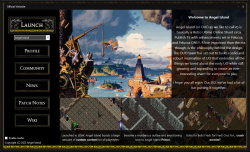
The launcher's current interface.

Click the link to visit the download portal for our launcher! Once there, click the download button (down-facing arrow) in the top left area of the screen. For complete installation instructions, visit Install & Connect.