Difference between revisions of "Downloads"

From GMN Wiki
Jump to navigation Jump to search
(Replace page with clean, standard MediaWiki landing page; remove custom layout and inline CSS)
 
(10 intermediate revisions by one other user not shown)
Line 1: Line 1:
<div id=swordborder style="
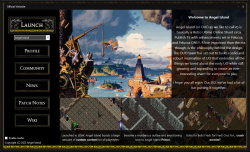
[[File:launcherss.png|thumb|right|250px|link=https://drive.google.com/file/d/1Rsur1WoEhkvmTMB3b6iFpHn_4Ar97WGQ/view?usp=sharing|The launcher's current interface.]]
left:-243px;
top:10px;">
[[File:wikisidebarart.png|link=Main_Page]]
</div>


<div id=swordborder style="
* '''[https://drive.google.com/file/d/1Rsur1WoEhkvmTMB3b6iFpHn_4Ar97WGQ/view?usp=sharing Download the Launcher]'''
left:-178px;
Click the link to visit the download portal for our launcher! Once there, click the download button (down-facing arrow) in the top left area of the screen. For complete installation instructions, visit [[Install & Connect]].
top: -172px;">
[[File:wikitop4.png|link=Main_Page]]
</div>
 
<div id=cf style="
left:-192px;
top: -122px;">
[[File:tchestbase2.gif|class=bottom|link=Main_Page]]
</div>
 
<div id=cf style="
left:-58px;
top: -109px;">
[[File:lit01.gif|class=bottom|link=Main_Page]]
</div>
 
<div id=cf style="
left:-145px;
top: -98px;">
[[File:lit02.gif|class=bottom|link=Main_Page]]
</div>
 
<div id=cf style="
left:-70px;
top: -123px;">
[[File:lit04.gif|class=bottom|link=Main_Page]]
</div>
 
<div id=cf style="
left:-161px;
top: -109px;">
[[File:lit06.gif|class=bottom|link=Main_Page]]
</div>
 
<div id=cf style="
left:-127px;
top: -83px;">
[[File:64.png|class=bottom|link=Main_Page]]
</div>
 
<div id=cf style="
left:-192px;
top: -121px;">
[[File:tchestlid2.gif|class=top|link=Main_Page]]
</div>
 
<div id=cf style="
left:-114px;
top: -135px;">
[[File:wikilogo5.png|class=bottom|link=Main_Page]]
</div>
 
<div id=cf style="
left:-182px;
top: -165px;">
[[File:aispwiki.png|class=bottom|link=Main_Page]]
</div>
 
{{#css:
 
#p-logo { display:none; }
 
#cf {
  position:absolute;
  margin:0 auto;
  width:238px;
}
 
#swordborder {
  position:absolute;
  margin:0 auto;
  width:1350px;
}
 
#cf img {
  position:absolute;
  left:0;
  -webkit-transition: opacity 0,2s ease-in-out;
  -moz-transition: opacity 0,2s ease-in-out;
  -o-transition: opacity 0,2s ease-in-out;
  transition: opacity 0,2s ease-in-out;
}
 
#swordborder img {
  position:absolute;
  left:0;
  -webkit-transition: opacity 0,2s ease-in-out;
  -moz-transition: opacity 0,2s ease-in-out;
  -o-transition: opacity 0,2s ease-in-out;
  transition: opacity 0,2s ease-in-out;
}
 
}
 
}}
 
</div>
 
 
[[File:launcherss.png|thumb|right|250px|link=https://drive.google.com/file/d/1Rsur1WoEhkvmTMB3b6iFpHn_4Ar97WGQ/view?usp=sharing]]
* '''<span style="font-size:110%">[https://drive.google.com/file/d/1Rsur1WoEhkvmTMB3b6iFpHn_4Ar97WGQ/view?usp=sharing Download the Launcher]</span>'''  


* [https://www.uocartographer.com/ UOCartographer]

Latest revision as of 05:11, 4 January 2026

The launcher's current interface.

Click the link to visit the download portal for our launcher! Once there, click the download button (down-facing arrow) in the top left area of the screen. For complete installation instructions, visit Install & Connect.